Privacy & Trust
The page a privacy officer can read end-to-end.
Structured, citable, scannable. Every claim on this page can be checked against the app source or a published regulator document.
Last reviewed 2026-05-13 · by Matthew Haskins
What “on-device” means here.
FaceGate is a phone app. Face detection, embedding (the 512-d vector that represents a face), matching, and classification all use the phone’s local processing. There is no network call to a FaceGate server, because there is no FaceGate server.
For why that choice changes the procurement conversation, see on-device vs cloud facial recognition.
- Photo
- Detect
- Match
- Verdict
- 01
Photo
Selected from the device gallery or camera.
- 02
Detect
ML Kit finds faces; FaceGate then crops and resizes each to 112 × 112 for embedding.
- 03
Match
AuraFace v1 embeds each face and compares it against the consent list.
- 04
Verdict
Safe, Unsafe, or Review - written to the local audit log.
Where everything lives and how to delete it.
Every category of data FaceGate touches — where it sits, and how to remove it.
- Photos you import
- Where it livesPhone storage only (sandboxed)
- How to delete itRemove from app gallery or Delete All Data
- Face crops & embeddings
- Where it livesOn-device SQLite database
- How to delete itSettings → Storage → Delete All Data
- Consent list (names, status, photos)
- Where it livesOn-device SQLite database
- How to delete itDelete a person individually, or Delete All Data
- Audit log
- Where it livesOn-device SQLite database
- How to delete itSettings → Clear audit log
Who can reach it? In every case, only the phone’s operator. There’s no FaceGate server and no remote access — nothing for an outsider to log in to.
APP-by-APP alignment.
Designed against the Privacy Act 1988 (Cth) and the 13 APPs. Below are the ones that bear directly on biometric data and the school-publishing workflow. Click any card to expand.
APP 1Open and transparent management of personal information.
How FaceGate satisfies it
We publish this page, the privacy policy, and a named privacy contact (below). The app discloses what it processes on first launch.
APP 3Only collect personal information that is reasonably necessary.
How FaceGate satisfies it
FaceGate collects names, face photos, and consent status - the minimum needed for matching. Nothing else.
APP 5Notify the individual of the collection.
How FaceGate satisfies it
The app's first-tap consent gate explains, in plain language, what is processed, why, and where it stays.
APP 6Use or disclose only for the primary purpose.
How FaceGate satisfies it
Biometric data is used solely to match against the consent list. There is no secondary use and no disclosure.
APP 8Take reasonable steps before disclosing personal information overseas.
How FaceGate satisfies it
FaceGate has no cross-border transfer to take steps about - biometric data never leaves the device.
APP 11Take reasonable steps to protect personal information.
How FaceGate satisfies it
On-device storage in the OS app-private sandbox, protected at rest by the operating system's built-in encryption when a device screen lock or passcode is set - FaceGate adds no encryption layer of its own. No network endpoints to attack; an enforced device lock, ideally via MDM, is the recommended control.
APP 12Provide access on request.
How FaceGate satisfies it
The consent list and audit log are visible in the app at any time. Export is available.
APP 13Correct personal information on request.
How FaceGate satisfies it
Every person, photo, status, and override is editable from inside the app. Re-classification is automatic.
Recent and upcoming changes.
10 June 2025
In forceStatutory tort of serious invasion of privacy (Cth)
Federal statutory tort creates a direct cause of action for serious privacy invasions. On-device-only design minimises exposure.
1 July 2026
In forceWA PRIS Act commences
The Western Australian Privacy and Responsible Information Sharing Act 2024 is now in effect for public-sector bodies including state schools.
10 December 2026
UpcomingChildren's Online Privacy Code in force
Federal code regulating online services likely to be accessed by children. FaceGate runs entirely on-device with no internet-delivered service component and is operated by adult school staff, so our documented, defensible position is that it falls outside the Code's scope - a position we'd re-assess if any cloud or web feature were ever added. This is our assessment, not legal advice.
1 January 2027
UpcomingWA Notifiable Information Breach provisions
Mandatory breach-notification provisions come into force in WA. FaceGate is designed to minimise breach surface - no central store to breach.
Reliability is operational, not a single number.
FaceGate runs on AuraFace v1 - ResNet100 with an ArcFace head, Apache 2.0 licensed and bundled with the app. Confidence is exposed at every step of the workflow rather than collapsed into one headline figure, and three operational mechanisms keep uncertain outputs visible to the operator.
Dual-threshold
Uncertain matches route to review
The cosine score is visible to the operator. Below the confident threshold the verdict is “Review”, not “Match” - there is no silent auto-classification.
Human-in-the-loop
Every verdict is overridable
Operators confirm, override, or escalate any classification. The verdict is recorded; the publication decision is the operator’s.
Audit trail
Every action is logged
Enrolments, classifications, overrides, and consent changes are timestamped with the model and thresholds in use - exportable for evidence packs.
A one-line model card.
- Name
- AuraFace v1
- Architecture
- ResNet100 + ArcFace head
- Embedding dim
- 512
- Licence
- Apache 2.0 (commercial)
- Publisher
- fal.ai
- Size
- ≈ 249 MB
- Input
- 112 × 112 RGB, normalised to [-1, 1]
The model is bundled with the app; no remote model fetch at runtime. The model identifier and threshold settings are written into every audit-log entry.
Everything that happens is recorded.
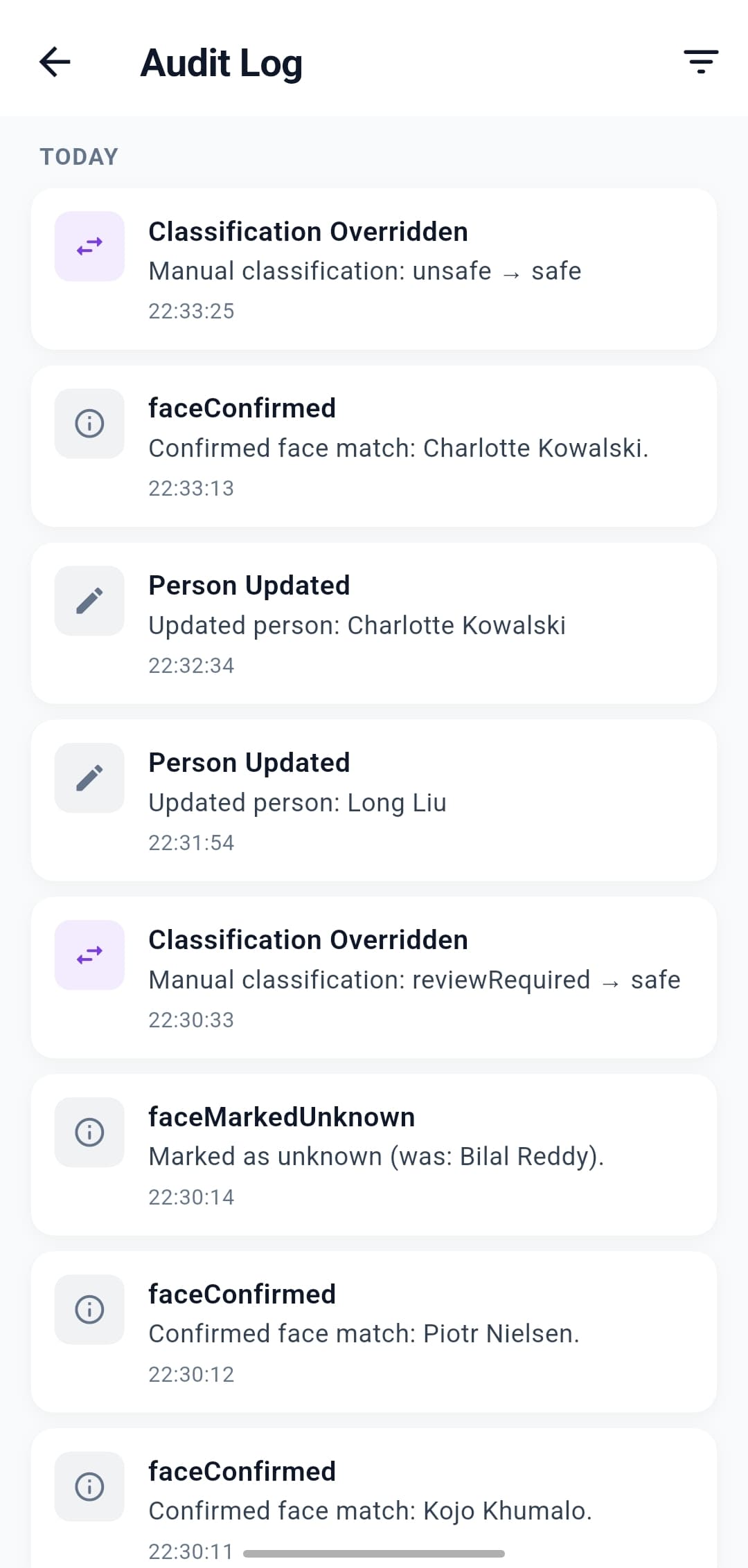
Every enrolment, classification, override, and consent change is logged with a timestamp, the model in use, and the thresholds applied - visible in the app at any time and exportable for evidence packs. The screen on the right is the live audit-log view operators see in the app.
- Append-only - the app only ever adds new entries; it never edits or back-dates past ones.
- Self-contained - model identifier, threshold values, and operator action are written into every entry.
- Portable - exportable as a CSV for procurement or compliance review without touching the cloud.
FAQ
Privacy questions, answered.
Is the data on the device encrypted, and does FaceGate add its own password?
Everything stays in app-private storage and is protected by the phone’s built-in encryption whenever a screen lock or passcode is set. FaceGate doesn’t add a separate app password, so a locked, encrypted device is the control - an enforced device lock, ideally through your device-management platform, is the recommended deployment.What happens if the phone is lost, stolen, or breaks?
Because everything is on the device, there is no central database to breach. A properly configured, locked device uses the operating system’s encryption and access controls to reduce the risk of unauthorised access. Recovery works because the device is never the system of record: the roster package your organisation holds is. A replacement device re-imports that package and rebuilds the consent list; face templates are regenerated on-device during import, and previously published images remain wherever you published them. Deliberately, FaceGate creates no backup files at all - biometric data never leaves the device, not even as an export - so there are no template files for IT to track, transport, or lose. Remote-wipe of a lost device is a function of your MDM, not the app.What happens to faces it doesn't recognise?
Unknown faces stay on the device until an operator triages them - reassigned to an existing person, enrolled as someone new, or marked unknown. Nothing about them is uploaded.What exactly does FaceGate store for each enrolled person?
On the device only, in app-private storage: a cropped image of the enrolled face and a small thumbnail, a numerical face template (the embedding used for matching), the consent category, and quality metadata. There is no cloud copy and none of it is uploaded. Deleting the person removes their stored faces and template from the device.
Direct line to the responsible person.
Privacy enquiries - whether from a school, parent, or regulator - come straight to Matthew Haskins, the founder and the named privacy contact.